How to manage your newsletter preferences using the Hubspot API
By: Carlos Mauri | January 12, 2026 | development, hubspot, and newsletter
HubSpot is a well-established and popular CRM that allows you to manage customer relationships. Among their marketing services, they have native newsletter management, which can help to foster a great relationship with your subscribers. Beyond relying on the default options for newsletter management, you can use the HubSpot API to tailor the customer's experience in selecting their communication preferences.
Context
The built-in, default subscription preferences for a HubSpot newsletter are included in a link located in the footer of each newsletter. Subscribers can manage their preferences by clicking the link, which opens an external HubSpot built-in page where the user can subscribe or unsubscribe to different topics.

This option is simple and functional, but if you want to allow your members to update their email preferences directly from their user account without having to click on a 3rd party link, then you need a more involved solution.
The HubSpot API
The HubSpot API has more than 500 endpoints, including a series of subscription preferences endpoints that allow you to manage email subscription details for contacts in your account.
There are 2 methods for accessing the API: Legacy Apps (also known as Private Apps), or OAuth 2.0 (only for public apps). With OAuth, you get a token that will be valid for 30 minutes (a very short lifespan, not well-suited for our purposes). However, with Legacy Apps, you can create access keys that last indefinitely (although it is recommended to rotate them periodically, for security purposes).
To create a Legacy App key, go to Development (main left sidebar) > Legacy Apps and click the "Create legacy app" button.

The scope section is an integral part of this configuration. Here, you are building access to target only what you really need for your purposes. In this case, you need read and write permission to run the "communication_preferences" endpoint.

If you are unsure what scope to select for your needs, make sure to review HubSpot's API documentation page (more on this below).
Once you have created the Legacy App, you can then get the access token and the client secret. You'll need those credentials when connecting with the API. All the app-related information is available under the "auth" tab. Access tokens can be easily rotated from there.

The implementation
To update the user's newsletter preferences, we have to:
- Get all the subscription status definitions from the account.
- Get the subscription preferences for a specific contact.
- Finally, update a contact's subscription status.
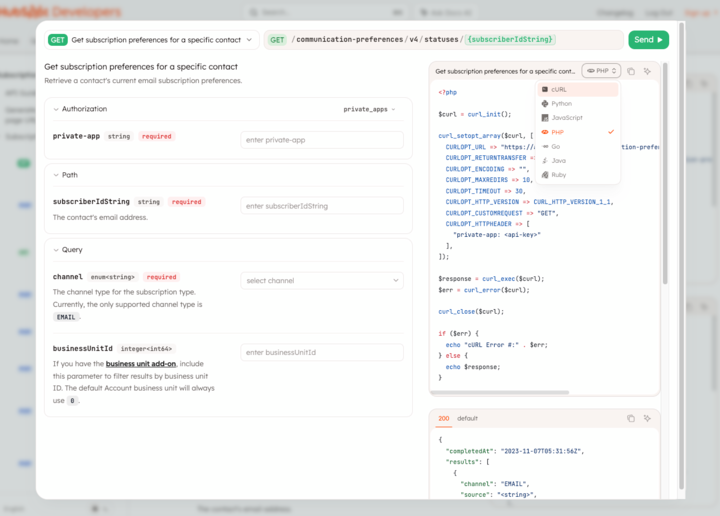
Thankfully, the HubSpot API documentation is very thorough and a vital resource. By selecting the endpoints you want to call, such as "Get subscription preferences for a specific contact", you can easily see the requirements and code examples in different languages, including PHP.
The best part is that you also get to test/play with the endpoint and check the response from that same interface.
This is a very generic PHP sample code (for WordPress) where you can see those API calls in action.
<?php
$current_user = wp_get_current_user();
 $user_email = urlencode( $current_user->user_email );
$newsletter_post_success = false;
 $current_email_preferences = [];
 $newsletter_form = [];
$error = [];
$hs_token = '[your-access-token-goes-here]';
// get definitions $curl = curl_init();
 curl_setopt_array( $curl,
array(    CURLOPT_URL => "https://api.hubapi.com/communication-preferences/v4/definitions",
  CURLOPT_RETURNTRANSFER => true,
  CURLOPT_ENCODING => "",
  CURLOPT_MAXREDIRS => 10,
  CURLOPT_TIMEOUT => 30,
  CURLOPT_HTTP_VERSION =>
 CURL_HTTP_VERSION_1_1,
  CURLOPT_CUSTOMREQUEST => "GET",
  CURLOPT_HTTPHEADER => array(
        "accept: application/json",
"authorization: Bearer ".$hs_token
    ),
)); $definitions_response = curl_exec( $curl );
 $err_definitions_response = curl_error( $curl );
 // get subscription preferences for a specific user curl_setopt_array( $curl, array(
    CURLOPT_URL => "https://api.hubapi.com/communication-preferences/v4/statuses/".$user_email."?channel=EMAIL",
  CURLOPT_RETURNTRANSFER => true,
    CURLOPT_ENCODING => "",
    CURLOPT_MAXREDIRS => 10,
    CURLOPT_TIMEOUT => 30,
    CURLOPT_HTTP_VERSION =>
    CURL_HTTP_VERSION_1_1,
    CURLOPT_CUSTOMREQUEST => "GET",
    CURLOPT_HTTPHEADER => array(
"accept: application/json",
      "authorization: Bearer ".$hs_token
    ),
 ));
$user_newsletter_response = curl_exec( $curl );
 $user_newsletter_err = curl_error( $curl );
 curl_close( $curl );
 if( $err_definitions_response )
{
    // render error
 }
elseif( $user_newsletter_err )
{
    // render error
 }
else
{
    // process API responses and generate an array with all the newsletter available topics with the options already selected by the user
 }
// process form submission
if ( $_SERVER["REQUEST_METHOD"] == "POST" )
 {
    // get submitted data and update user newsletter preferences    $newsletter_post_success = true;
 }
// HTML form section
if( empty( $error ) )
 {
    if( $newsletter_post_success )
    {
       // Display successful message
    }
    // render form + submit button
 }
else
 {
    // display error
 }
  ?>
With this, we now have a custom solution that our members can use to update their newsletter preferences from within their user account!

Testing
To test if your code is working as expected, you can either keep using the API to get the latest newsletter status or go to the HubSpot administration interface. In the administration interface, go to CRM > Contacts, search for the contact you've been testing with, and confirm the newsletter preferences are correct by clicking on the "View subscriptions" link.


API limitations
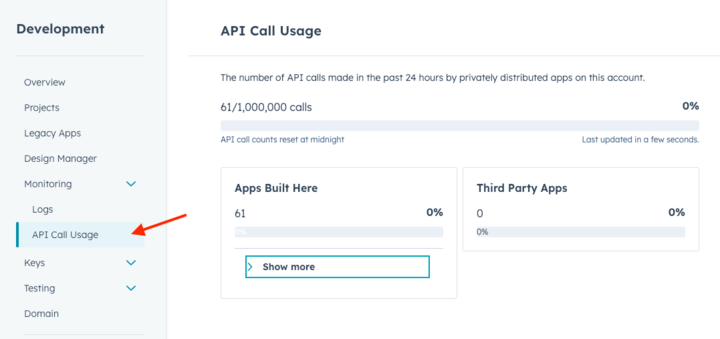
It is worth mentioning that the API has a limit of 250,000 requests per day on the free tier, or up to 1 million requests per day for the enterprise account.
You can check your limit by looking at the "API Call Usage" view.
Working with APIs can be a mixed bag, often totally dependent on the level of documentation provided. HubSpot has excellent documentation and makes customizing the CRM functions simple, to ensure your customers have the best experience possible.