Mugo partner since 2025
St. Thomas Public Library launches new website with expanded features.
There are many reasons libraries need new websites. Sometimes, new technology forces necessary updates, new features need to be implemented, a site doesn’t meet accessibility standards, a current developer no longer supports the site, or it just needs to be easier for staff to use. And when it comes time to start a new library project, there are even more considerations to take into account. For St. Thomas Public Library (STPL), library staff knew they needed an accessible site that was easier for staff to use, fit their brand, and made their staff workflows more efficient. Furthermore, they needed expanded functionality to cover gaps left by a discontinued service, KitKeeper, that previously managed their book club kits.
All these factors led them to Mugo Web, whose all-in-one library CMS fit their needs and their budget. “As KitKeeper died, there were more and more features tied up in a Mugo-shaped bow that could solve our problems,” said Aaron DeVries, CEO of STPL. “We were already paying separately for event registration through another vendor. The cost savings of moving to Mugo made it a good time to change. The affordability of everything included compared to the cost of the solution made it an easy choice.”
DeVries went on to talk about what made Mugo a good choice for a development partner for STPL. “I appreciate the size of the company. I feel like we have Mugo’s attention and keep it. Whenever we have a need, it’s answered directly. It doesn’t feel like a typical corporation. The vibe is that Mugo cares about its clients.”
Development on the new website for STPL began in the spring of 2025. The new website was set to include all of the core Mugo Library features, including the custom event calendar and registration system, meeting room management, and book club kit management. The design of the new site incorporated the existing STPL brand, while adding new elements and colour palettes to provide better contrast and accessibility. The new elements have influenced library marketing efforts, and the enhanced features on the website has made it easier for staff to promote events and initiatives. Amelia Bainbridge, Communications & Donor Relations Coordinator for STPL explains more, “I’ve pulled some of the colours from the design, and the shapes to use in other designs and materials. We did a local history display for Remembrance Day and put it in the news section. I can pull content from this for social media and other content. It’s nice having a spot on the site to send people for topics. I know I’ll be using the new site for promoting future projects.”

Patrons have noticed the change. “I run a tech talk program for seniors, and recently I gave them a tour of the new site, and there was great feedback on the accessibility,” reported Jonathan Mitchell, IT Coordinator. “One patron mentioned the ease of use of the new menu; they don’t lose their place and can get to what they need. Patrons are thankful that it’s easier to use. They notice things are larger and easier to see.”
After the site launch, Mugo Web continued development on several new features to enhance the functionality of the Mugo Library platform, which STPL was the first to test and deploy. Carlos Mauri, Mugo Web developer and project manager for the STPL project, spoke more about the additional development, “We recently implemented a suite of powerful features to improve the experience for both editors and patrons. We also added better reporting and a quick patron lookup to help admin teams save time and access the information they need faster. Lastly, we also developed a ‘Find my registration’ feature that allows patrons to receive an email to see a full list of events they are registered for.”
The "Find my registration" feature utilizes the email patrons have registered with, and sends a secure message to that address with the list of registrations. Giving patrons this option frees up time for librarians, who previously would have had to do manual lookups on request.

This improvement goes hand-in-hand with a new backend feature that lets staff look up registrations by email address across the whole calendar, not just event by event.

Another improvement to the calendar system came at the request of STPL staff directly: a new backend calendar interface to make it easier for staff to find events and edit listings. Previously, the events were listed by title in the backend, with organization determined and controlled by the library. With search features, it could be easy to directly access event details without having to navigate through the individual files. Occasionally, however, desk staff would be looking up information without knowing the exact name of the event, or in the case of recurring events, it could be hard to find the exact program they were looking for. The calendar gives staff a way to go immediately to the event in question, even if they don’t know all the details.

Event statistics are an important metric for libraries, both for internal use and for organizational reporting. Previously, in the Mugo Library system, all individual events could have their data exported to CSV for compiling into larger reports. While this worked and technically fit the need, it could be better. Mugo developed a new reporting system for events that allows library staff to set a date range and pull event registration details (including name of program, date and time offered, location of program, number of people registered, number of people on the waitlist, number of cancellations, and link to event listing). The data is displayed in a table in the CMS and is exportable to CSV.

An enhancement was also made to the custom forms feature to allow for conditional logic. Libraries use the custom forms in many different ways, and conditional logic will open up even more opportunities for detailed surveys, event-specific forms, and more.

Staff have seen positive responses to the new site, both internally and externally. Site usage is up, compared to comparable months in the previous year. In particular, site admins have been able to see how often the feature cards on the home page are used. Patrons are finding key library services, like the newsletter, much easier.

The ease of creating new content on the site has led to changes in how the staff publishes information. For instance, when it comes to job postings, site administrators would typically publish this as a PDF on the previous site. Now they can publish it as a web page, increasing the discoverability of the information. Additionally, “It’s more accessible to do it as a webpage instead of a PDF,” reported Bainbridge.
On the library side, staff enjoy the easy printability of the event calendar and the UI improvements in creating programs and registration forms. An essential part of a successful web development project is making sure that onboarding staff to the new systems goes smoothly. Adjusting to new workflows is often beneficial, but can be challenging as users adjust to new technology. But that hasn’t been an issue for STPL. “Staff are using the site really well,” said Bainbridge.
Mitchell elaborated, “The training on the new site was easy to follow, and being able to go back and review training videos has been so helpful.”
Mugo Web is always there to help clients as they adjust to their new website, but support doesn’t end at launch. “Oftentimes, with other companies, you have an onboarding team that disappears after the initial contact,” DeVries commented. “That wasn’t the case with Mugo.”

In Canada and the US, the vast majority of provinces, states, and territories observe daylight savings time. We are scheduled to change our clocks on Sunday, November 1, 2026, falling back by 1 hour at 2:00am.
However, on March 2 of this year, the province of British Columbia decided not to observe any more time changes starting on November 1, staying on permanent daylight savings time. On June 18, Alberta made the same decision. And most recently, on September 17th, Manitoba decided to follow this precedent and will likewise stay on daylight savings permanently, starting this November.
This created some work for content editors and website developers in those provinces, and what should have been a simple update ended up requiring some investigation. Here's the story of why event calendars started to display the wrong time for events, and how we fixed it.

This year, two Canadian provinces, BC and Alberta, moved to make Daylight Saving Time permanent. This created an issue with event registrations for some of our library clients, an interesting technical solution, and the potential for future implications down the road as other provinces (and the US) potentially join the trend. This and more in August’s Mugo Digest!

Our library client wanted to allow patrons to apply for library cards via their website. The client had existing restrictions on access to cards. Local residents receive free cards while visitors and non-residents pay a fee. Individual patrons should not have access to more than one library card. Therefore the system had to automatically validate and standardize addresses to support duplicate detection, determine a geographical position for each address, and finally classify addresses as local or non-local. We supported this using GeoJSON and integrating with the library's ILS. We tested this functionality a number of ways, including an exploration into the mathematic principles behind the solution.
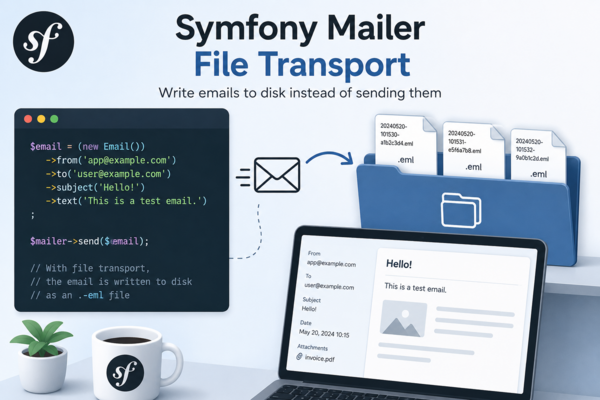
When developing a Symfony application, you often need to inspect the emails your application generates without actually sending them. While tools like Mailpit or Mailtrap are excellent choices, sometimes you want something even simpler: write every email to disk as a standard .eml file.
This approach is particularly useful for:
In this article, we'll build a custom Symfony Mailer transport that stores every outgoing email as an RFC 822 compatible .eml file.

When creating content in Ibexa using the RichText Editor, it is easy to realize that not every RichText field needs the same toolbar. A ”Body” field may need headings, embeds, and tables. A ”Short Description” or ”Caption” field usually needs bold, italic, and little else. When every field gets the full CKEditor toolbar, it might make editors waste time or even make them think they can add markup your templates were never built for.
Legacy eZ Publish solved this. Ibexa DXP does not, at least out of the box. In this blog post we describe how we added this feature to Ibexa 4.

Welcome to Mugo Web's new monthly digest, a quick way to catch up with some of the things we've been working on. In July we marked a momentous anniversary, launched a brand new site for a client, and offered free educational opportunities.

A new update to the Mugo Page Bundle now allows for a straightforward migration from eZ Flow to Ibexa DXP. We’ve also added functionality to this versatile tool with a new rich text block type.

The latest improvements to the Mugo Library platform focus on enhanced usability for library staff. Since these back-end improvements aren’t as noticeable as the front-end user experience, we wanted to take the opportunity to give a peek “under the hood”, and showcase what makes the Mugo Library event and calendar solution ideal for public libraries. Our new enhancements include expanded reporting, a new viewing interface, back-end patron search, and integration with the meeting room module.
Mugo Web
Unit 205, 332 Columbia Street
New Westminster, BC
V3L 1A6, Canada
Phone: 604-637-6396
E-mail: hi@mugo.ca