Partner since 2025
Bruce County Public Library launches new, streamlined website for better staff and patron usability.
Bruce County Public Library (BCPL), an Ontario library with 17 branches, knew it was time for a new website. The staff were all in agreement that their site was lackluster and complicated to use. “We had to ask every time we needed to make a change,” shared Joanna Griffith, Assistant Director. “It was clunky, and we were looking for a platform we could easily update.”
The library team had internal meetings to set their goals for the new website, and how they wanted to overcome the challenges of their existing site. They knew they wanted a way to highlight the physical locations of their many branches, and knew they needed an easier-to-use event calendar with program registration. They wanted to showcase their catalogue with better integration on the website. And primarily, they wanted something easier to navigate, for patrons and staff alike.

After an extensive RFP process, BCPL chose Mugo Web as its new development partner. “Price was a big factor,” said Brooke McLean, Director of Library Services, when discussing how Mugo Web won the bid. “But more importantly, it was Mugo’s experience building other library websites, the expertise and understanding of what we needed in a library site in particular.”
Development began on “not just an upgrade, but a complete overhaul,” per McLean.
The process required effort on behalf of the library stakeholders, but overall, “it was easier than we anticipated,” reflected McLean. “Having Mugo identify what they needed from us was incredibly helpful and made the process smoother than we expected.”
Griffith agreed. “It was a lot of work, but it was easy. The Mugo team guided us, and it was clear the steps the development team were going to take and what was needed.”
Key to the initial design was developing a new feature to showcase the BCPL branches in an interactive map. Patrons could search by location, browse by map, or scroll through the list of libraries. The interactive map brings up quick contact info and also directs to a dedicated branch page.

The branch pages have the individual maps, contact info, hours, and amenities prominently displayed. They list the events coming up at that location, and include a custom "about" section with a history of the branch and a scrolling gallery of images from the location. The local flair and customization of this tool make each branch stand out and help emphasize the local community.

Having control of the site’s content was a critical point identified by the staff’s strategic planning in preparing for a new site, and Mugo Web’s custom library platform delivered that. Not only can staff add pages and content on the fly, but many of the elements on the website, such as the announcement banners, can be scheduled for publication, freeing up staff time. “Scheduling the alerts is life-changing,” Griffith said. “We don’t forget to take things down. We can have multiple banners at a time, which is helpful, especially since we have so many branches, with different issues.”

The Mugo Library event calendar and registration system has not only helped in the ease of management of events, but has had additional unforeseen benefits in future planning. Registration, with waiting lists, shows staff which programs are most popular, with some unexpected results. “We had a program in October with Indigenous presenters on the history of treaties, and that registration filled in days,” McLean reported. “It gave us an indicator to do more programs like this, based on the interest.”
BCPL knew that a new website was a big change for their staff and communities, so they made the choice early in the development process to delay integration of several new-to-them features, such as room management and book club kit management. Having a full-scale development partner means that future improvements to a website can be quoted separately and added when needed. The additional features were deployed a few months after launch and brought new functionality to the fresh website.
The meeting rooms are filterable by branch, which helps patrons navigate directly to the service they need. Custom calendars show availability for each room and provide an interface for requesting space.

With so many branches and staff members, having tiered permissions along with an internal workflow for approval of content publication was important for site administrators. The Mugo Library platform features the ability to customize permissions for each level of the site. Event editors, room managers, and supervisors can each have different roles within the system and access only the content applicable to their role. Looking to the future, BCPL hopes to use the interface to schedule in-house resources, such as 3D printers.

This year, two Canadian provinces, BC and Alberta, moved to make Daylight Saving Time permanent. This created an issue with event registrations for some of our library clients, an interesting technical solution, and the potential for future implications down the road as other provinces (and the US) potentially join the trend. This and more in August’s Mugo Digest!

Our library client wanted to allow patrons to apply for library cards via their website. The client had existing restrictions on access to cards. Local residents receive free cards while visitors and non-residents pay a fee. Individual patrons should not have access to more than one library card. Therefore the system had to automatically validate and standardize addresses to support duplicate detection, determine a geographical position for each address, and finally classify addresses as local or non-local. We supported this using GeoJSON and integrating with the library's ILS. We tested this functionality a number of ways, including an exploration into the mathematic principles behind the solution.
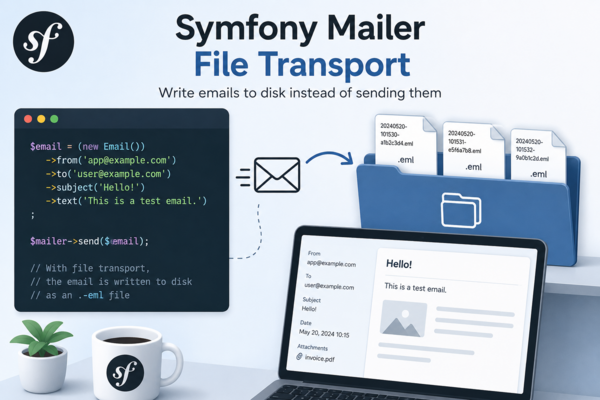
When developing a Symfony application, you often need to inspect the emails your application generates without actually sending them. While tools like Mailpit or Mailtrap are excellent choices, sometimes you want something even simpler: write every email to disk as a standard .eml file.
This approach is particularly useful for:
In this article, we'll build a custom Symfony Mailer transport that stores every outgoing email as an RFC 822 compatible .eml file.

When creating content in Ibexa using the RichText Editor, it is easy to realize that not every RichText field needs the same toolbar. A ”Body” field may need headings, embeds, and tables. A ”Short Description” or ”Caption” field usually needs bold, italic, and little else. When every field gets the full CKEditor toolbar, it might make editors waste time or even make them think they can add markup your templates were never built for.
Legacy eZ Publish solved this. Ibexa DXP does not, at least out of the box. In this blog post we describe how we added this feature to Ibexa 4.

Welcome to Mugo Web's new monthly digest, a quick way to catch up with some of the things we've been working on. In July we marked a momentous anniversary, launched a brand new site for a client, and offered free educational opportunities.

A new update to the Mugo Page Bundle now allows for a straightforward migration from eZ Flow to Ibexa DXP. We’ve also added functionality to this versatile tool with a new rich text block type.

Mugo partner since 2025
St. Thomas Public Library launches new website with expanded features.

The latest improvements to the Mugo Library platform focus on enhanced usability for library staff. Since these back-end improvements aren’t as noticeable as the front-end user experience, we wanted to take the opportunity to give a peek “under the hood”, and showcase what makes the Mugo Library event and calendar solution ideal for public libraries. Our new enhancements include expanded reporting, a new viewing interface, back-end patron search, and integration with the meeting room module.
Mugo Web
Unit 205, 332 Columbia Street
New Westminster, BC
V3L 1A6, Canada
Phone: 604-637-6396
E-mail: hi@mugo.ca