
Twitter tip: Prompting users to follow you after they Tweet
By: Peter Keung | August 20, 2012 | Business solutions
There are many variations to social media strategies to suit particular client sites and goals. Some implementation details, on the other hand, are universally applicable. One such detail is a Twitter feature whereby a user is prompted to follow your Twitter account whenever they share your content.
For "Share on Twitter" / Tweet buttons, you can add a "via" parameter to the Tweet intent URL, triggering behavior that can gain you new followers.
Once a visitor has clicked your Tweet button, the enhanced behavior is seen in two places:
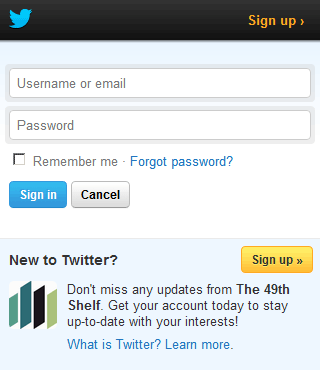
1. If the visitor is not logged in to Twitter, they'll see a short blurb about your Twitter account at the bottom:
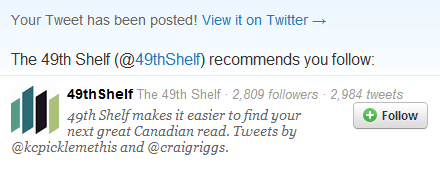
2. After the user has Tweeted, if they are not yet following you, they will be prompted to do so:
If you've built your own Tweet buttons, you just have to append "via=relevant_username" to the end of the Tweet intent URL:
https://twitter.com/share?url=http%3A%2F%2Fwww.mugo.ca%2FBlog%2FAccidental-DDOS-by-desktop-news-aggregator&via=mugo
If you use a third-party widget to generate your Tweet buttons, the documentation is straightforward to support the "via" parameter; see the AddThis and ShareThis documentation.
Depending on how you've implemented your Tweet button, you can also recommend more accounts for users to follow using the "data-related" parameter. Be sure to consult the Tweet button documentation for more information on that.